Ad Formats
An ad format is a description of the elements that make up the visualization of an ad. It defines which elements are possible and which are required.
Let’s look at an example of a graphical ad below:

Breaking it into elements, we get the format:

- IMG 1: first image with size 340x500px
- IMG 2: second image with size 280x420px
- TITLE: title
- SUBTITLE: subtitle
- CTA: (Call To Action) text on the action button
- (not labeled) Background color: in the example light khaki/light sand
#d6c280(the color is determined by the specific ad, not the format).
We configure the above format in the AdsHero panel as follows:
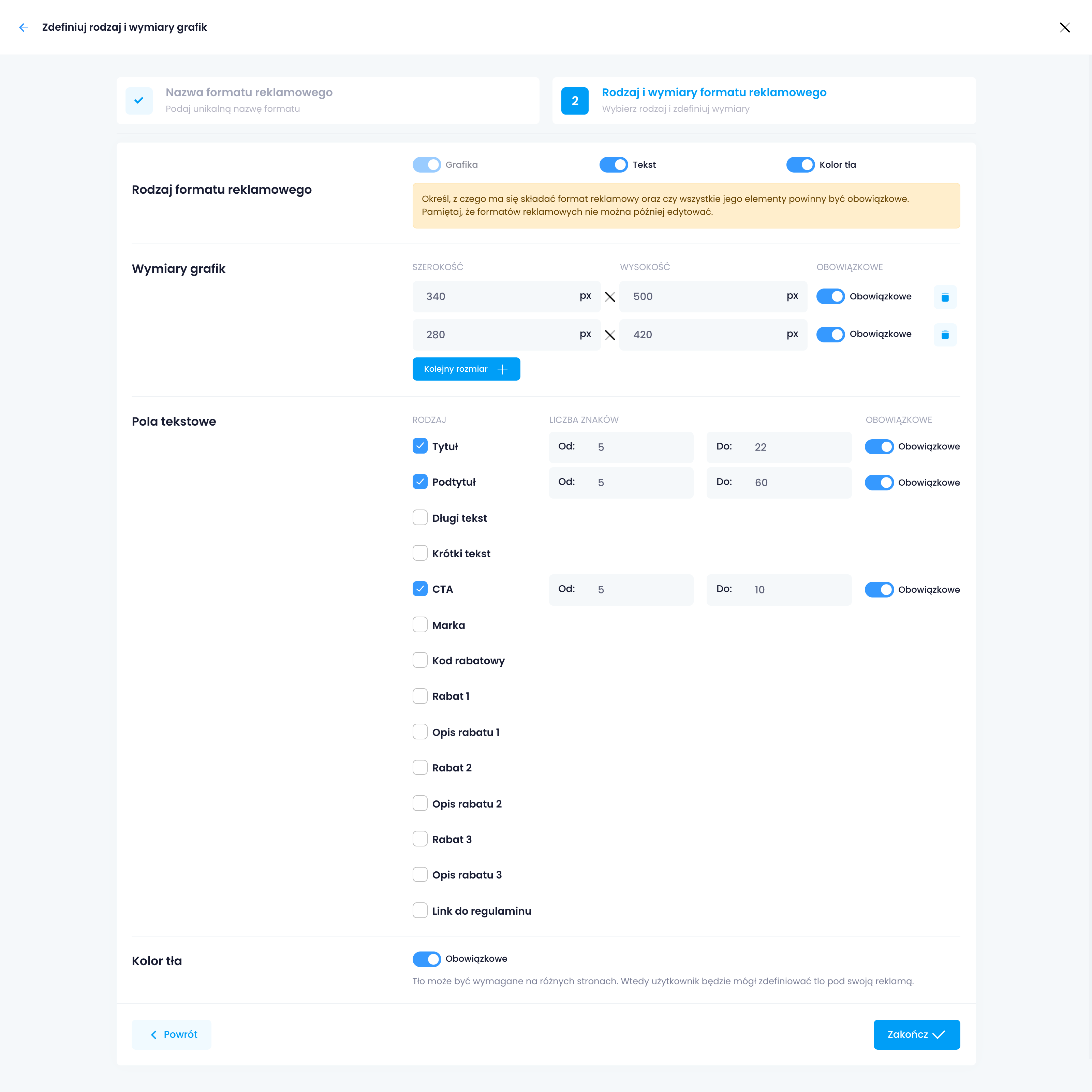
All fields in the format are configured with parameters:
- Character count “from” “to”: minimum and maximum character count in the field
- Mandatory: whether the field is required in ads
Each field has a default meaning. Below is a description of the field meanings:
| Name | Description |
|---|---|
| Title | Main title of the ad |
| Subtitle | Text displayed under the title |
| Long text | Long text on the ad |
| Short text | Short text on the ad |
| CTA | Text on the button to proceed to the linked page |
| Brand | Brand visible on the ad |
| Custom Label 1 | Additional custom label or detail |
| Custom Label 2 | Second additional custom label or detail |
| Custom Label 3 | Third additional custom label or detail |
| Discount code | Discount code to use in the shop |
| Discount 1 | First discount level (% discount / discount amount) |
| Discount description 1 | Text next to the first discount level |
| Discount 2 | Second discount level (% discount / discount amount) |
| Discount description 2 | Text next to the second discount level |
| Discount 3 | Third discount level (% discount / discount amount) |
| Discount description 3 | Text next to the third discount level |
| Link to terms | Link to the terms (e.g., promotion) |